Pricing
Sign inBook a DemoStart Free
Start Free
Sign in
Book a DemoStart Free
Pricing

What we offer

AuthoringExperiencesVideo ConversionCustom VideoConversationsTranslationSharing & IntegrationsAnalyticsAccessibility

Featured case

Laing O'RourkeVan Den Bosch
View All Case Studies

Support

Help CenterTrust Portal

Learn

TemplatesBlogUpdatesCommunity
About UsPartnersCareers

Why Mindsmith

vs. EasyGenerator

The AI-native authoring studio for designers who take the craft seriously.

Product

  • Authoring
  • Pricing
  • Compare

Resources

  • Blog
  • Updates
  • Help Center
  • Trust Portal
  • Status

Company

  • About
  • Partners
  • Careers
  • Case Studies

Community

  • Slack Community

© 2026 Mindsmith. All rights reserved.

PrivacyTerms
Pricing
Sign inBook a DemoStart Free
Start Free
Sign in
Book a DemoStart Free
Pricing

What we offer

AuthoringExperiencesVideo ConversionCustom VideoConversationsTranslationSharing & IntegrationsAnalyticsAccessibility

Featured case

Laing O'RourkeVan Den Bosch
View All Case Studies

Support

Help CenterTrust Portal

Learn

TemplatesBlogUpdatesCommunity
About UsPartnersCareers

Why Mindsmith

vs. EasyGenerator

The AI-native authoring studio for designers who take the craft seriously.

Product

  • Authoring
  • Pricing
  • Compare

Resources

  • Blog
  • Updates
  • Help Center
  • Trust Portal
  • Status

Company

  • About
  • Partners
  • Careers
  • Case Studies

Community

  • Slack Community

© 2026 Mindsmith. All rights reserved.

PrivacyTerms
Pricing
Sign inBook a DemoStart Free
Start Free
Sign in
Book a DemoStart Free
Pricing

What we offer

AuthoringExperiencesVideo ConversionCustom VideoConversationsTranslationSharing & IntegrationsAnalyticsAccessibility

Featured case

Laing O'RourkeVan Den Bosch
View All Case Studies

Support

Help CenterTrust Portal

Learn

TemplatesBlogUpdatesCommunity
About UsPartnersCareers

Why Mindsmith

vs. EasyGenerator
Back to Updates
July 2, 2026

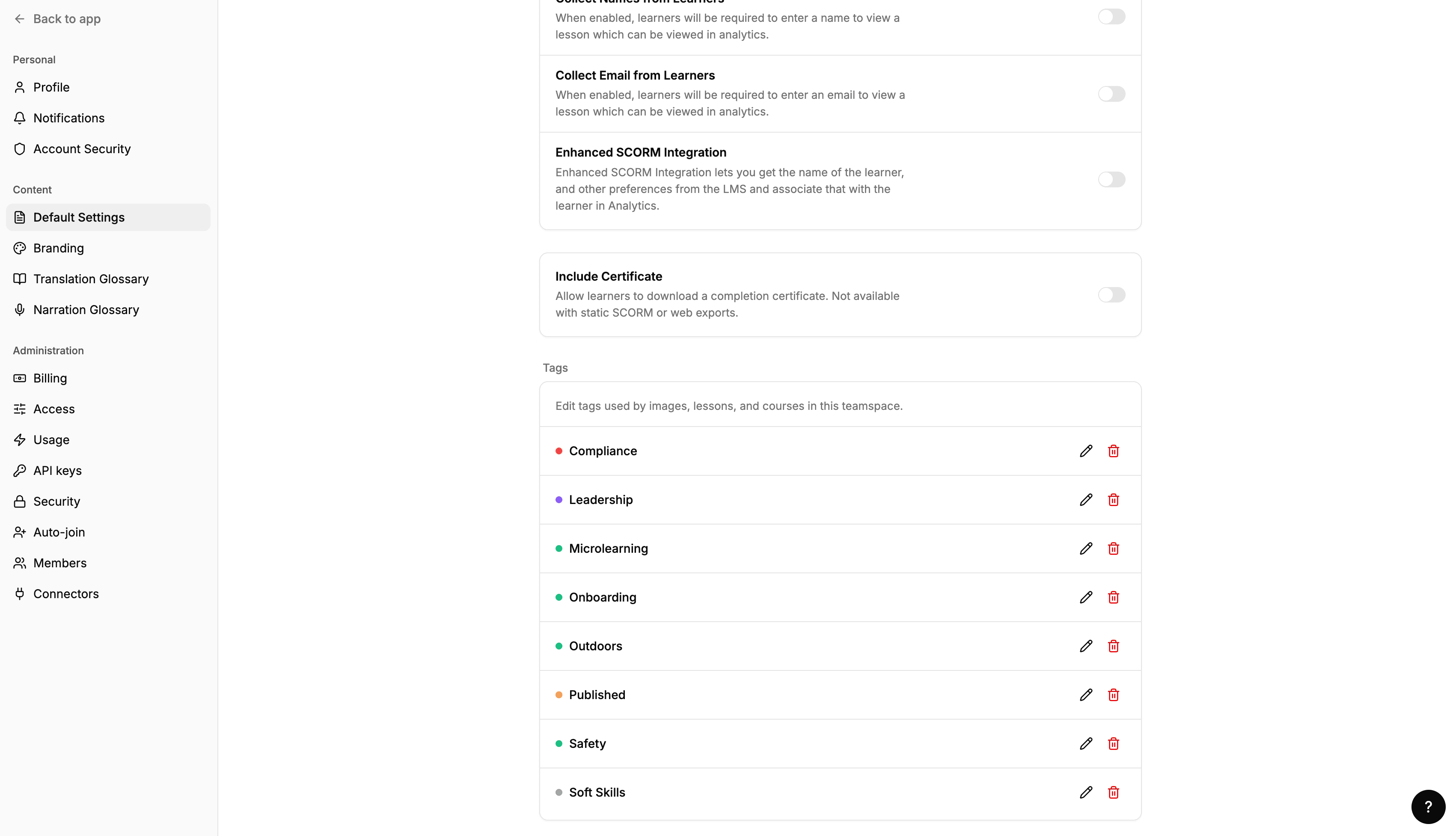
Manage content tags from settings

Rename, recolor, or delete content tags from Settings, with a usage count shown before you delete one.

Manage content tags from settings

Content tags can now be managed from Settings. Rename any tag, change its color, or delete it — and before you delete, you'll see a count of how many lessons and courses are using it.

Previously, tags were created and assigned from the dashboard but had no dedicated management view. This gives you a single place to keep your tag taxonomy tidy.

Back to all updates

The AI-native authoring studio for designers who take the craft seriously.

Product

  • Authoring
  • Pricing
  • Compare

Resources

  • Blog
  • Updates
  • Help Center
  • Trust Portal
  • Status

Company

  • About
  • Partners
  • Careers
  • Case Studies

Community

  • Slack Community

© 2026 Mindsmith. All rights reserved.

PrivacyTerms