Pricing
Sign inBook a DemoStart Free
Start Free
Sign in
Book a DemoStart Free
Pricing

What we offer

AuthoringExperiencesVideo ConversionCustom VideoConversationsTranslationSharing & IntegrationsAnalyticsAccessibility

Featured case

Laing O'RourkeVan Den Bosch
View All Case Studies

Support

Help CenterTrust Portal

Learn

TemplatesBlogUpdatesCommunity
About UsPartnersCareers

Why Mindsmith

vs. EasyGenerator

The AI-native authoring studio for designers who take the craft seriously.

Product

  • Authoring
  • Pricing
  • Compare

Resources

  • Blog
  • Updates
  • Help Center
  • Trust Portal
  • Status

Company

  • About
  • Partners
  • Careers
  • Case Studies

Community

  • Slack Community

© 2026 Mindsmith. All rights reserved.

PrivacyTerms
Pricing
Sign inBook a DemoStart Free
Start Free
Sign in
Book a DemoStart Free
Pricing

What we offer

AuthoringExperiencesVideo ConversionCustom VideoConversationsTranslationSharing & IntegrationsAnalyticsAccessibility

Featured case

Laing O'RourkeVan Den Bosch
View All Case Studies

Support

Help CenterTrust Portal

Learn

TemplatesBlogUpdatesCommunity
About UsPartnersCareers

Why Mindsmith

vs. EasyGenerator

The AI-native authoring studio for designers who take the craft seriously.

Product

  • Authoring
  • Pricing
  • Compare

Resources

  • Blog
  • Updates
  • Help Center
  • Trust Portal
  • Status

Company

  • About
  • Partners
  • Careers
  • Case Studies

Community

  • Slack Community

© 2026 Mindsmith. All rights reserved.

PrivacyTerms
Pricing
Sign inBook a DemoStart Free
Start Free
Sign in
Book a DemoStart Free
Pricing

What we offer

AuthoringExperiencesVideo ConversionCustom VideoConversationsTranslationSharing & IntegrationsAnalyticsAccessibility

Featured case

Laing O'RourkeVan Den Bosch
View All Case Studies

Support

Help CenterTrust Portal

Learn

TemplatesBlogUpdatesCommunity
About UsPartnersCareers

Why Mindsmith

vs. EasyGenerator
Back to Updates
July 13, 2026

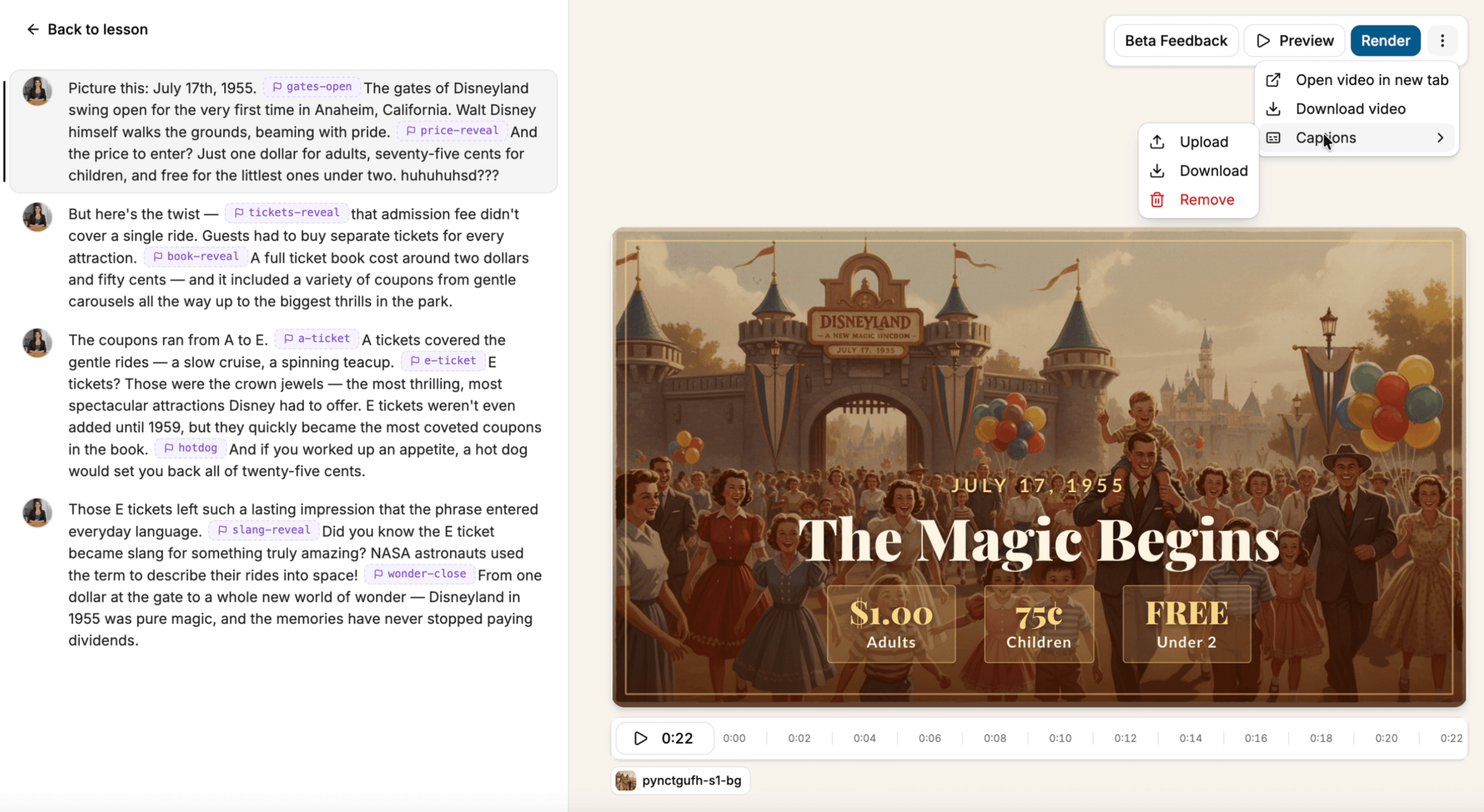
Manage captions directly in the video editor

A new captions menu in Mindsmith Video V2 lets editors add, download, or remove captions, and download the video with a matching caption file.

Caption management menu in Mindsmith Video V2

Mindsmith Video V2 now includes a dedicated captions menu in the video editor. Add captions to a video, download the caption file separately, or remove them entirely — all from one place. When downloading a finished video, you can also download it with a matched caption file attached, ready to upload to any platform that accepts separate caption tracks.

Back to all updates

The AI-native authoring studio for designers who take the craft seriously.

Product

  • Authoring
  • Pricing
  • Compare

Resources

  • Blog
  • Updates
  • Help Center
  • Trust Portal
  • Status

Company

  • About
  • Partners
  • Careers
  • Case Studies

Community

  • Slack Community

© 2026 Mindsmith. All rights reserved.

PrivacyTerms