Pricing
Sign inBook a DemoStart Free
Start Free
Sign in
Book a DemoStart Free
Pricing

What we offer

AuthoringExperiencesVideo ConversionCustom VideoConversationsTranslationSharing & IntegrationsAnalyticsAccessibility

Featured case

Laing O'RourkeVan Den Bosch
View All Case Studies

Support

Help CenterTrust Portal

Learn

TemplatesBlogUpdatesCommunity
About UsPartnersCareers

Why Mindsmith

vs. EasyGenerator

The AI-native authoring studio for designers who take the craft seriously.

Product

  • Authoring
  • Pricing
  • Compare

Resources

  • Blog
  • Updates
  • Help Center
  • Trust Portal
  • Status

Company

  • About
  • Partners
  • Careers
  • Case Studies

Community

  • Slack Community

© 2026 Mindsmith. All rights reserved.

PrivacyTerms
Pricing
Sign inBook a DemoStart Free
Start Free
Sign in
Book a DemoStart Free
Pricing

What we offer

AuthoringExperiencesVideo ConversionCustom VideoConversationsTranslationSharing & IntegrationsAnalyticsAccessibility

Featured case

Laing O'RourkeVan Den Bosch
View All Case Studies

Support

Help CenterTrust Portal

Learn

TemplatesBlogUpdatesCommunity
About UsPartnersCareers

Why Mindsmith

vs. EasyGenerator

The AI-native authoring studio for designers who take the craft seriously.

Product

  • Authoring
  • Pricing
  • Compare

Resources

  • Blog
  • Updates
  • Help Center
  • Trust Portal
  • Status

Company

  • About
  • Partners
  • Careers
  • Case Studies

Community

  • Slack Community

© 2026 Mindsmith. All rights reserved.

PrivacyTerms
Pricing
Sign inBook a DemoStart Free
Start Free
Sign in
Book a DemoStart Free
Pricing

What we offer

AuthoringExperiencesVideo ConversionCustom VideoConversationsTranslationSharing & IntegrationsAnalyticsAccessibility

Featured case

Laing O'RourkeVan Den Bosch
View All Case Studies

Support

Help CenterTrust Portal

Learn

TemplatesBlogUpdatesCommunity
About UsPartnersCareers

Why Mindsmith

vs. EasyGenerator
Back to Updates
July 13, 2026

Two ways to work faster in Mindsmith Video V2

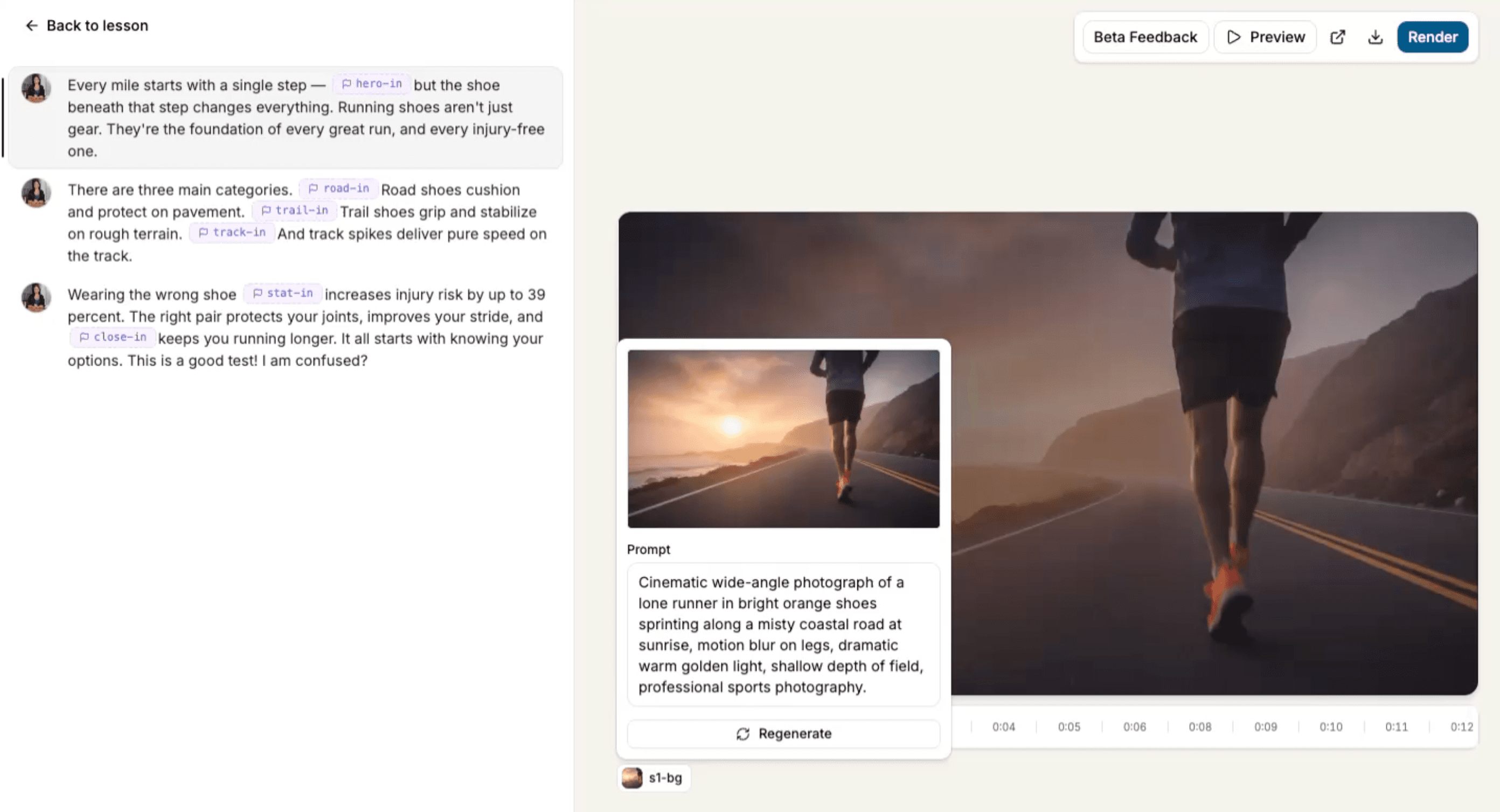
Edit a scene's image prompt before regenerating, and preview all scenes as one continuous playback — both new in Mindsmith Video V2.

Editable scene image prompt and continuous scene preview in Mindsmith Video V2

Mindsmith Video V2 picked up two editor improvements that speed up how you build and review a video:

  • Editable scene image prompts. When regenerating a scene image, the prompt is now editable before you re-run it — no more being locked to the original text. Refine the direction in place and regenerate immediately.
  • Continuous scene preview. Play back all scenes in a lesson as one continuous preview, the same experience a learner will have, instead of clicking into each scene separately.
Back to all updates

The AI-native authoring studio for designers who take the craft seriously.

Product

  • Authoring
  • Pricing
  • Compare

Resources

  • Blog
  • Updates
  • Help Center
  • Trust Portal
  • Status

Company

  • About
  • Partners
  • Careers
  • Case Studies

Community

  • Slack Community

© 2026 Mindsmith. All rights reserved.

PrivacyTerms